Online access
Need help accessing or managing your mortgage online? Find answers about registration, the LoanNav app, getting started, business-purpose loans, and accessing your account outside the U.S.
General Help
Setting up your online account lets you manage your loan your way—anytime, anywhere.
Our secure and easy-to-use website will help you:
View your loan details such as balance, payoff date, interest, taxes, and more
Quickly make or schedule one-time payments
Set up autopay (recurring monthly ACH drafts)
Access your statements and other documents
Check your transaction history
If you have a HELOC account, request an advance/draw during open draw periods
Enroll for e-statements to stop receiving paper copies in the mail
Explore ways to own your home sooner
Generate a payoff quote
View activity on your escrow account, if you have one
Message with our team members
And more!
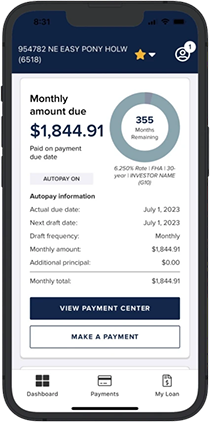
LoanNav Features:
360° View of Your Loan
Review your loan balance, maturity date, interest rate, payment history, and more!
Quick Payment Options
Set up and manage autopay (monthly ACH drafts), or make and schedule one-time payments.
See Escrow Activity
See your current escrow balance, recent tax and/or insurance bills paid on your behalf, and expected upcoming bills.
Access Documents
View monthly mortgage statements, year-end tax statements, and other correspondence sent to you.
Message with Us
Have a question or need help? Send us a secured message, and our Customer Care team will get back to you.
How to Register Online
Registering online is quick and easy. Here's how:
Click Login.
Click Register Your Account.
Enter your last name, SSN or EIN/TIN, date of birth, and email address (all fields are required) and click Next.
Verify your information.
View our user terms and privacy policy, and if you agree, check the box to accept them.
Gain 24/7 access to your loan!
Contact us! We’ll be happy to help.
You may also check to see if our website is compatible with your internet browser. Our website is compatible with the following:
Microsoft Edge
Firefox Version 27 or higher
Chrome Version 38 or higher
Safari – Desktop Version 7 or higher
Safari – Mobile Version 5 or higher
Access is available in the following countries:
United States
Australia
British Virgin Islands
Canada
Finland
Germany
Greenland
Guam
India
Japan
Mexico
Micronesia
Portugal
Puerto Rico
South Korea
United Kingdom
U.S. Virgin Islands
Business-Purpose Loans: How to Register Online
Registering online is quick and easy. Here's how:
Click Login.
Click Register Your Account.
Follow the prompts to enter and verify your information.
If your loan is for business purposes, you can register with either of the following:In the Last name field, enter your business name; under ID type, select EIN/TIN to enter the Tax Identification Number.
NOTE: The business name must match the name we have on file for your loan. The welcome letter and/or email sent to you should provide the business name we have for your loan -- please refer to the online registration section for this information.Enter the guarantor information (last name and social security number).
Once verified, view our user terms and privacy policy. If you agree, check the box to accept them.
Gain 24/7 access to your loan!
Contact Customer Care at 866.500.0756. We’re here to support you!
In addition, check to see if our website is compatible with your internet browser. Our website is compatible with the following:
Microsoft Edge
Firefox Version 27 or higher
Chrome Version 38 or higher
Safari – Desktop Version 7 or higher
Safari – Mobile Version 5 or higher
Access is available in the following countries:
United States
Australia
British Virgin Islands
Canada
Finland
Germany
Greenland
Guam
India
Japan
Mexico
Micronesia
Portugal
Puerto Rico
South Korea
United Kingdom
U.S. Virgin Islands
Getting Started
Once you're logged into your account, you can:
See an overview of your loan, including balance, interest information, payoff date, escrow details, payment history, and more. Go to My Loan in the main menu.
Explore our online payment options. Go to Payment to make or schedule payments, set up autopay (monthly ACH drafts), or check your existing autopay settings.
Find your Document Library, where you'll be able to see future billing statements, escrow analysis statements, year-end tax statements, and more. Click or tap Documents.
Enroll for Paperless Statements to receive emails when new statements are available. Go to Documents and find the Manage Delivery Preferences section.
Confirm your communication preferences. Go to My Loan, then find the Loan information section to see your mailing address, email address, and phone numbers. To change your preferences, click Edit.
Access to your loan/account is available in the following countries:
United States
Australia
British Virgin Islands
Canada
Finland
Germany
Greenland
Guam
India
Japan
Mexico
Micronesia
Portugal
Puerto Rico
South Korea
United Kingdom
U.S. Virgin Islands